

Contents of this article
- Screening stocks by relative strength (RS)
- Screening stocks with the RSI
- Screening stocks with moving averages
- Screening stocks with the Stochastic
- Here is how to set up a stock screen with the Stochastic
- Screening stocks with the MACD
- Here is how to set up a stock screen with the MACD
- Screening for liquidity with trading volume
- Combining several screens
- Technical Analysis Course – CMT Level 1

By the end of 2021, the Vietnamese stock market had about 1,700 stocks listed across its three exchanges, HOSE, HNX and UPCoM. Many of them represent businesses that are well run and have growth prospects, yet for some reason many have “not yet” risen, leaving investors who bought them with losses. So how do you know when it is the right time to buy a stock? Let’s explore with Green Chart how to screen stocks for signals using technical analysis (the tool used in this article is the Plus24 screener from the brokerage firm MBS).
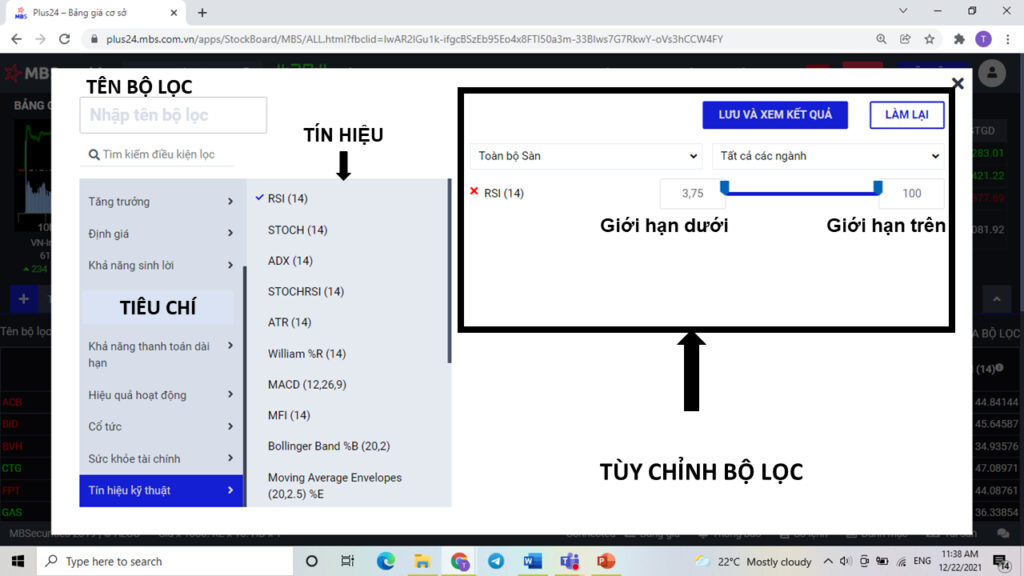
Screening stocks by relative strength (RS)
The relative strength (RS) indicator shows how much a stock has risen or fallen relative to a broad index, usually the VN-Index. Comparing a stock’s RS with the VN-Index helps investors pick out strong stocks and, combined with other criteria, identify market leaders. In the Plus24 MBS screener, a value of -50 means the stock has risen 50% less than the VN-Index, and a value of 50 means it is rising 50% more than the VN-Index. This indicator also answers the question investors most often ask when looking for trading opportunities: “Which stocks are rising?“
Below is a simple guide to screening stocks by 1-month relative strength. You can do the same for 3-month, 6-month or 1-year periods.

RS settings
- Set RS with a lower limit of 10 and an upper limit of 50 to find strongly rising stocks.
- Set RS with a lower limit of -5 and an upper limit of 10 to find stocks rising in line with the VN-Index.
- Set RS with the default lower limit and an upper limit of -10 to find falling stocks.
- Set RS with a lower limit of 50 and an upper limit of 100 to find the market’s very strongest risers.
Screening stocks with the RSI
RSI – Relative Strength Index is a momentum indicator used in technical analysis to measure the strength of price, invented by J. Welles Wilder in 1978. RSI is usually calculated over 14 sessions.
RSI is closely linked to a stock’s gains and losses, so it is classed as a momentum indicator. If we borrow a little from physics, RSI can be thought of as the acceleration of the price chart. When price has more up sessions than down sessions over a given period, RSI will be high, signalling strong upward momentum, and vice versa.
RSI helps distinguish a stock’s overbought and oversold levels; the oversold level is usually 30 and the overbought level 70. The screener therefore helps investors find stocks whose signals are in a buyable or sellable range. Depending on the settings, investors can also find oversold stocks for “bottom-fishing” or overbought stocks to “exit positions”.
Here is how to set up the RSI screen

Investors drag the upper and lower limits of the RSI range with the mouse, or click the value box and edit it as needed:
- To find stocks in the oversold zone for “bottom-fishing”, set the upper limit to 25–30 and the lower limit to 0.
- To find stocks in the overbought zone for taking profit, set the lower limit to 70–75 and the upper limit to 100.
Screening stocks with moving averages
The moving average (MA) is probably the first technical indicator you need to know when studying technical analysis. There are two main types: the SMA (often just called the MA) and the EMA (Exponential Moving Average).
Moving averages measure a stock’s trend, and the periods used to calculate the MA or EMA are the investor’s own choice. Commonly used periods are 5 sessions (one trading week), 20 sessions (one trading month) and 250 sessions (one trading year).
Besides showing the trend, the MA is also used as dynamic resistance for a stock. A stock breaking above or hugging its MA, or two MAs crossing, signals a sudden change and a sell or buy signal. With the MBS screener, investors can filter short-term signals using: Price vs. MA; Price vs. EMA; SMA vs. SMA; EMA vs. EMA.
Here is how to set up the price vs. EMA(10) screen
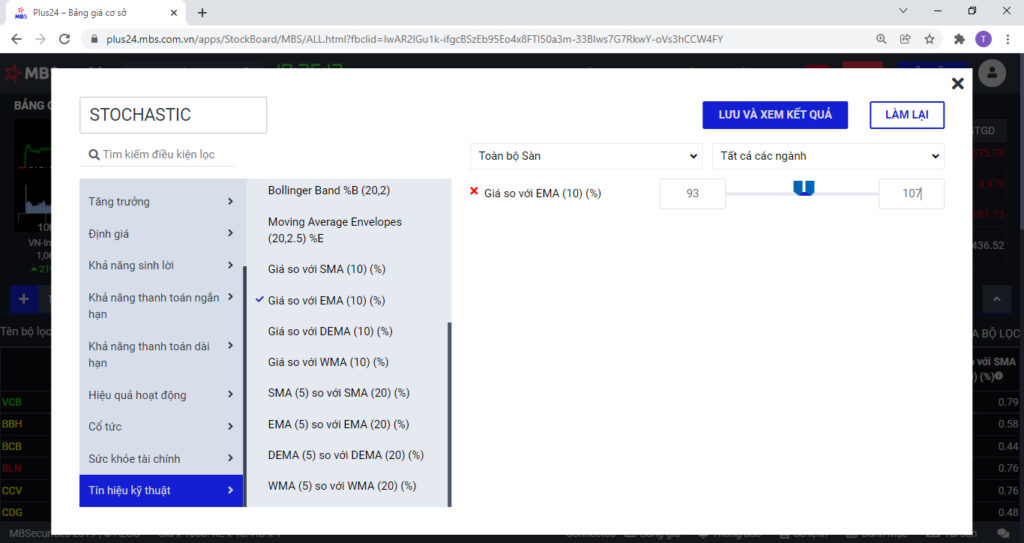
- To find stocks moving close to the trend line (here the EMA 10), set the lower limit to 93 and the upper limit to 100. With a 7% range, we can consider the stock to be following the trend closely. At this level, investors may consider buying in gradually and combining it with other screens to find stocks with good signals.
- To find stocks with strong upward momentum, you can set the lower/upper limits to 70–93 or 107–130. These are stocks whose price has moved far from the MA, but they also carry a high risk of reversal.
- To pick stocks in a short-term uptrend, you can use the EMA(5) vs. EMA(20) criterion with a lower limit of 10% or more.
Screening stocks with the Stochastic
The Stochastic indicator is a momentum indicator used in technical analysis, developed in the late 1950s by George Lane (some say it was developed by Ralph Dystant). It shows where price stands relative to its highest and lowest levels over a preceding period.
The indicator comes with three parameters (x, y, z); remember them, because they are tied to the formulas used to build the Stochastic, which I present below. The most commonly used settings are (14, 3, 3) and (5, 3, 3).
Here is how to set up a stock screen with the Stochastic

- To find stocks signalling a sell point, set the lower limit to 80 and the upper limit to 100.
- To find stocks signalling a buy point, set the lower limit to 0 and the upper limit to 20.
Screening stocks with the MACD
The MACD indicator (Moving Average Convergence Divergence) is a momentum and trend indicator developed by Gerald Appel. MACD is often regarded as a more advanced variant of the moving average.
Here is how to set up a stock screen with the MACD

- To find stocks in an uptrend, set the lower limit to 0 and leave the upper limit at its default.
- To find stocks in a downtrend, set the upper limit to 0 and leave the lower limit at its default
Screening for liquidity with trading volume
A stock’s average trading volume over different periods helps investors gauge its liquidity as well as whether it is accumulating or breaking out. Next, I will show you how to screen for stocks with good liquidity that are in an accumulation zone and have just seen a volume breakout in the session.

- To pick stocks with good liquidity, set a lower limit of 100,000 and the default upper limit, or 1,000,000 or more, for the 20- or 60-session average trading volume – i.e. the last 1 to 3 months.
- To see whether a stock has signalled a volume breakout, set trading volume vs. 20-session average volume to between 2 and 5 times.
Combining several screens
Sometimes a single filter cannot extract the very best. So, to pick stocks in good technical shape, investors can combine several types of signal, such as Stochastic and RSI overbought/oversold screens together with trend signals from moving averages…

Today many websites and companies offer stock screeners, such as Fialda, FireAnt… or MBS, which we use here. We wish you success in building your own stock screener.
Technical Analysis Course – CMT Level 1
Green Chart designed this course specifically for candidates in Vietnam who want to study and prepare for the CMT Level I exam. The programme includes 27 sessions of theory, practice questions and mock exams. Students also receive the course textbook, question bank and mock exams free of charge for their exam preparation, and can retake the course for free for life.
See more details about the course here.
Happy Trading !
![[TECHNICAL INSIGHTS] – Event-Driven Strategies in the Vietnamese Market](https://greenchart.vn/wp-content/uploads/2026/05/Ava-768x768.png)
![[TECHNICAL INSIGHTS] – The FFR and Its Impact on Market Regimes (Part 3)](https://greenchart.vn/wp-content/uploads/2026/02/a4-768x768.jpg)